APIGENERAL Change LogForum
ABOUT VATOM WALLET
Introduction
EXPERIENCE KIT
A Micro-Site Within a Wallet
Experience Kit Overview
1. Confirm Developer Privileges
2. Expose Your Brand
3. Start A Micro-Site
4. Embed Micro-Site in wallet
5. Add Experience Kit Features
WALLET SDK
Web Wallet SDK
About Web Wallet SDK
Create a Sample App
Add Wallet Page
Embed Wallet Inventory View
iOS Wallet SDK
About iOS Wallet SDK
Android Wallet SDK
About Android Wallet SDK
Flutter Wallet SDK
About Flutter Wallet SDK
IDENTITY SDK
Manage Identity
Identity SDK Overview
Add Identity Test Pages
LOGIN PAGE
Customize Login
Custom Login Overview
Hidden Elements
SSO Providers
Background
Card
Header
Input, Label, & Button
Implicit Terms
Footer
Text
SPARK PLUGINS
Spark Plugins Overview
Add API Credentials
Request by sending an email to developer@vatom.com
Implicit Terms
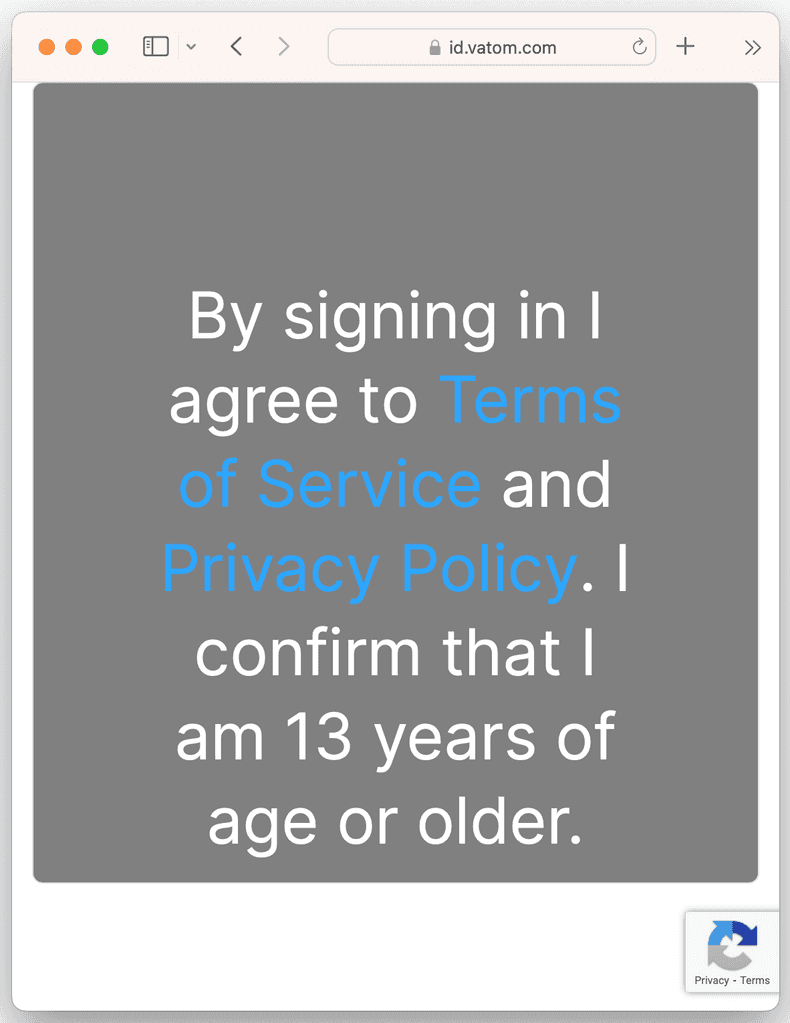
The implicitTerms element allows you to style text stating terms that the user implicitly accepts upon signing in. This text contains links to additional pages containing details of the terms.
Implicit Terms Example
The following example applies white text and a font size of 48px to the implicit terms text on a card with a gray background which in turn is displayed over a white background. All other elements are hidden. Note that the white text style does not affect the hyperlinks. The font size affects all of the text.
Implicit Terms Example
{
    "features": {
        "auth": { "ssoProviders": [] }
    },
    "theme": {
        "header": {
            "logo": { "style": { "display": "none" } },
            "title": { "style": { "display": "none" } }
        },
        "background": {
            "style": {
                "backgroundColor": "white"
            }
        },
        "card": {
            "style": {
                "backgroundColor": "gray"
            }
        },
        "label":  { "style": { "display": "none" } },
        "input":  { "style": { "display": "none" } },
        "button": { "style": { "display": "none" } },
        "implicitTerms": {
            "style": {
                "color": "white",
                "fontSize": "48px"
            }
        },
        "footer": { "style": { "display": "none" } }
    }
}